Author: admin

  • Google Review Stand with Tap Card and QR Code: A Practical Guide for Businesses

    Google Review Stand with Tap Card and QR Code: A Practical Guide for Businesses

    Introduction

    Online reviews have become an important part of how customers discover and evaluate local businesses. Before visiting a restaurant, booking an appointment, choosing a salon, or purchasing a service, people often look at a company’s online presence and customer feedback. For businesses that depend on local visibility, making it straightforward for customers to find the appropriate review page can therefore be useful.

    One way businesses approach this is through physical review signage. Instead of asking customers to remember a business name, search for it online, find the correct listing, and then locate the review section, a review stand can provide a direct starting point from the place where the customer is already interacting with the business.

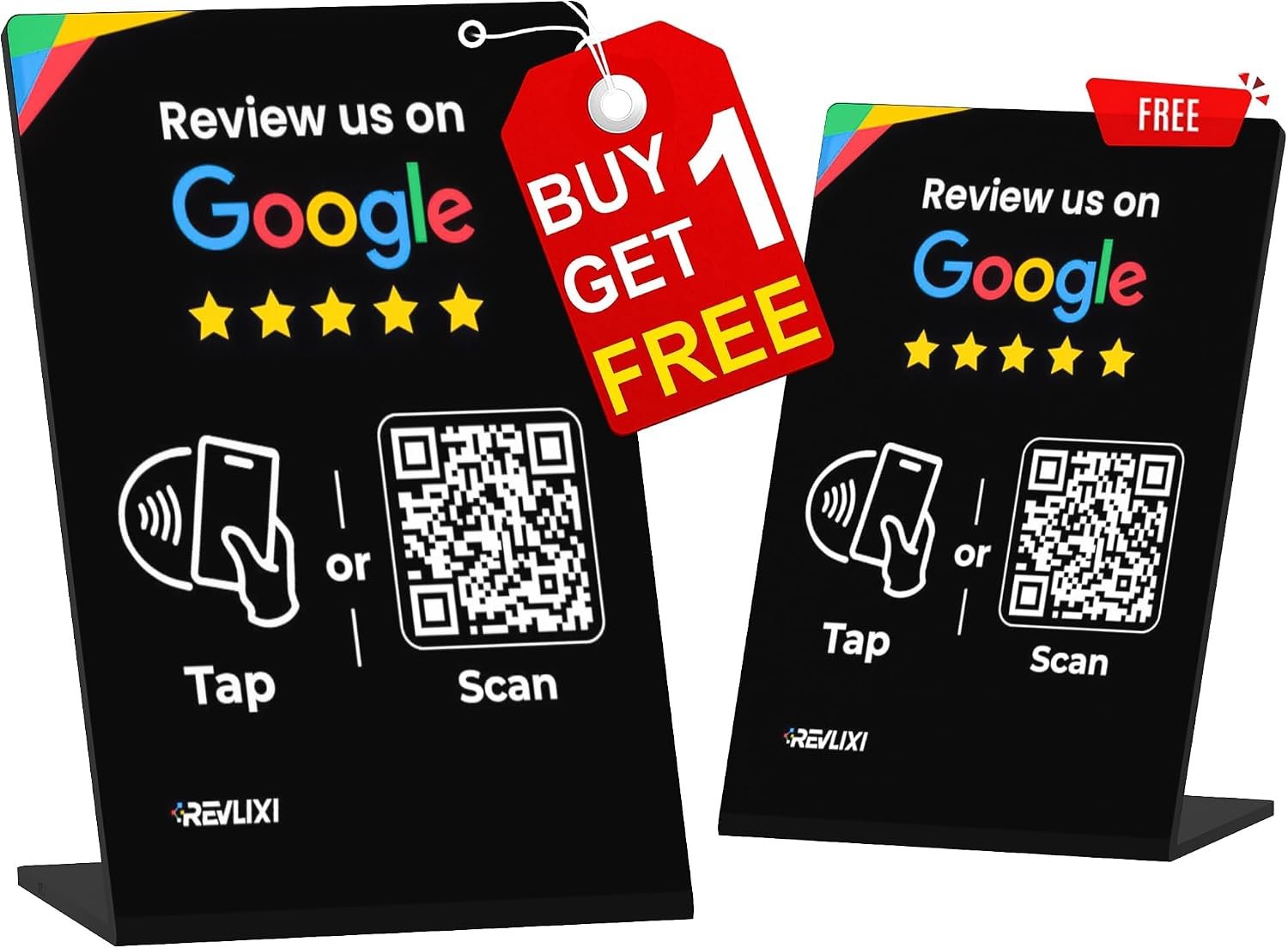
    The Google Review Stand with reusable tap card and QR code is designed around this concept. The product combines a physical countertop display with two common smartphone interaction methods: NFC-style tap functionality and QR code scanning. The listed design is intended to work with both Android and iPhone devices, while the product description emphasizes that customers do not need a dedicated app or subscription to interact with the stand.

    This type of product can be useful in environments such as restaurants, salons, retail stores, reception desks, professional offices, and other customer-facing businesses. However, understanding how the technology works and how it should be incorporated into a customer experience is just as important as the physical design itself.

    This guide explains the main features and potential applications of a reusable Google review stand, while also covering practical considerations, differences between NFC and QR-based systems, customer experience, and common questions businesses may have before introducing this type of signage.

    What Is a Google Review Stand?

    A Google review stand is a physical display that provides customers with a convenient way to access a business’s online review destination.

    Without a dedicated sign, a customer may need to search for the company manually. Depending on the business name, location, and search results, this can involve several steps.

    A review stand can simplify the process by placing an access point directly in the business.

    The product described here uses two approaches:

    • A tap-based card or NFC interaction
    • A QR code that can be scanned with a smartphone

    These methods serve a similar purpose but work differently.

    NFC relies on short-range wireless communication between a compatible smartphone and the NFC-enabled component. QR codes, on the other hand, use the phone’s camera to recognize a visual pattern.

    Providing both options allows customers to choose whichever interaction feels more natural on their device.

    Key Features

    Reusable Review Stand Design

    A reusable physical stand can be placed in a consistent location within a business rather than being treated as a disposable promotional item.

    This can be useful for businesses that want to maintain a permanent review-access point at locations such as:

    • Reception desks
    • Checkout counters
    • Restaurant host stations
    • Salon reception areas
    • Customer service desks
    • Waiting areas
    • Front offices

    Because the stand is intended for repeated use, businesses can incorporate it into their everyday customer environment.

    The long-term usefulness of the physical display depends on how well it fits into the business’s workflow and whether the associated digital destination remains correctly configured.

    Tap-Based Interaction

    The tap functionality is one of the main features of this type of review stand.

    NFC, or Near Field Communication, is a short-range technology that allows compatible devices to interact when they are brought close together.

    Many modern smartphones include NFC capabilities, although exact behavior can vary between devices and operating systems.

    For a customer, the interaction can be relatively straightforward: bring a compatible smartphone close to the designated tap area and follow the notification or link presented by the device.

    The appeal of NFC is that it does not require the user to position a camera over a QR code.

    However, NFC should not be treated as universally identical across every smartphone. Device compatibility, settings, operating-system behavior, and other factors can influence the experience.

    QR Code Access

    The QR code provides a second route to the digital destination.

    QR codes have become common in restaurants, stores, advertisements, packaging, menus, event materials, and business signage. Most modern smartphones can recognize QR codes through their camera applications.

    For a review stand, this means a customer can simply point the phone’s camera toward the code and follow the displayed link.

    The visual nature of a QR code can also make its purpose relatively easy to understand. A customer who does not use NFC can still interact with the sign.

    Android and iPhone Compatibility

    The product description identifies compatibility with Android and iPhone devices.

    This is relevant because businesses generally serve customers using different smartphone platforms rather than a single ecosystem.

    Providing both tap and QR options can help accommodate these differences.

    However, businesses should still test the stand with multiple devices before placing it into regular use. Compatibility claims describe the intended use, but real-world phone behavior can vary according to model, software version, settings, and browser configuration.

    No Dedicated App

    Another notable aspect of the product description is that customers do not need a dedicated application to use the review stand.

    This can reduce friction.

    Requiring customers to download an app for something as simple as accessing a review page could create an unnecessary barrier. QR codes and NFC links can generally be used through standard smartphone features such as the camera, browser, and operating-system NFC support.

    The exact interaction will still depend on the customer’s device.

    No Subscription-Based Interaction

    The product is also presented as not requiring a subscription for the customer interaction.

    This distinction is worth understanding.

    A physical NFC or QR sign and a subscription-based digital management platform are two different concepts. Some business tools offer advanced dashboards, analytics, campaign management, or other cloud-based features through recurring services.

    A straightforward review stand focuses primarily on providing access to the configured destination.

    Businesses should still verify the specific product configuration and setup requirements relevant to their use case.

    How It Can Be Used

    Restaurants and Cafés

    Restaurants are a natural environment for countertop review signage because customers often interact with staff at predictable points.

    A stand can potentially be placed at:

    • The host stand
    • The cashier
    • The reception counter
    • A designated checkout area

    For example, a customer finishing a meal may notice the stand while paying or speaking with staff.

    The important principle is convenience rather than pressure. Customers should be free to decide whether they want to provide feedback.

    A review stand simply reduces the number of steps involved for customers who choose to do so.

    Salons and Barbershops

    Salons, barbershops, spas, and other appointment-based businesses commonly have reception areas.

    A review stand can fit naturally on a reception desk where customers check in, make appointments, or complete payment.

    Because the stand is visible at an established customer interaction point, staff may not need to repeatedly explain where customers can find the business online.

    The QR option can accommodate customers who prefer scanning, while NFC can provide an alternative for compatible smartphones.

    Retail Stores

    Retail businesses can use physical review signage at checkout counters or customer service areas.

    A small stand can remain visible without taking up the space required for larger promotional displays.

    For specialty stores, showrooms, and local retailers, this can provide a connection between the in-person shopping experience and the business’s online presence.

    The placement should not interfere with payment terminals, receipts, product displays, or other equipment.

    Hotels and Guest Services

    Hotels and hospitality businesses often have front desks where customers naturally spend time.

    A review stand could potentially be positioned in an appropriate area of the reception environment.

    However, hospitality businesses should consider the customer’s privacy and comfort when requesting feedback. A review option should remain voluntary.

    Professional Offices

    Local professional services can also use countertop review signage.

    Examples include:

    • Agencies
    • Consultants
    • Repair services
    • Studios
    • Training businesses
    • Customer-facing offices
    • Appointment-based services

    The stand can provide a physical reminder that an online review option is available without requiring employees to give customers a long set of instructions.

    Who May Find This Type of Product Suitable?

    Small Businesses

    Small businesses with a physical location may benefit from having a simple, permanent review-access point.

    This can be especially practical where there is a single reception or checkout area.

    Local Service Providers

    Businesses that depend on local search visibility may find physical review signage useful as part of a broader customer communication strategy.

    Examples include home-service companies, salons, repair shops, studios, and appointment-based businesses.

    Restaurants and Hospitality Businesses

    Businesses that regularly interact with customers in person can place a stand at a logical point in the customer journey.

    Retailers

    Retail stores with a checkout counter or customer service desk can use the stand as part of their physical customer-facing setup.

    Businesses With Multiple Smartphone Users

    Because the product offers both QR and tap-based interaction, it can potentially accommodate customers with different smartphone habits.

    This is useful in environments where customers use a mixture of Android and iPhone devices.

    Understanding the Customer Journey

    A review stand is most useful when it fits naturally into an existing customer journey.

    Consider a simple sequence:

    1. A customer visits the business.
    2. The customer receives the service or completes a purchase.
    3. The customer reaches a natural stopping point.
    4. The customer notices the review stand.
    5. The customer chooses whether to interact with it.
    6. The customer is directed to the relevant online destination.

    The stand does not create customer satisfaction by itself. It simply makes the digital feedback process more accessible.

    That distinction is important.

    A physical review sign should be viewed as an access tool rather than a replacement for good service, customer communication, or reputation management.

    Important Things to Consider

    Verify the Correct Google Business Profile

    Before deploying a review stand, businesses should confirm that the QR and NFC destination leads to the correct business listing.

    This is especially important for businesses with:

    • Multiple locations
    • Similar business names
    • Separate branches
    • Recently changed listings
    • Multiple online profiles

    Sending customers to the wrong location could create confusion and make the sign less useful.

    Test the QR Code

    QR codes should be tested before the stand is placed in a customer-facing location.

    A simple test can involve several smartphones.

    The business can confirm that:

    • The code scans correctly.
    • The link opens.
    • The intended business listing appears.
    • The review destination is appropriate.
    • The page works on mobile devices.

    Testing under normal lighting conditions can also be useful because reflections or poor placement may affect scanning.

    Test NFC Separately

    NFC functionality should also be tested independently from the QR code.

    A business can try the tap interaction with different compatible Android and iPhone devices to determine whether the expected notification or link appears.

    This is particularly useful because NFC behavior can vary between devices.

    Keep the Sign Visible

    A review stand cannot help much if customers do not notice it.

    Placement should therefore be intentional.

    A good location is generally somewhere customers naturally pause without creating an obstruction.

    For example, the checkout counter may work better than a shelf behind the cashier.

    Avoid Counter Clutter

    The sign should remain visually accessible.

    If it becomes buried beneath receipts, menus, paperwork, promotional materials, or other objects, customers may overlook it.

    Keeping a small amount of space around the stand can improve visibility.

    Consider the Physical Environment

    The stand will be used in a real business environment.

    Restaurants may have spills or frequent cleaning. Retail counters may experience constant movement. Reception desks may contain paperwork and equipment.

    Businesses should consider whether the selected placement is appropriate for the environment and whether routine cleaning or handling could affect the display.

    Review the Digital Destination Periodically

    A QR code or NFC destination is only useful if the associated link remains correct.

    Businesses that change their Google Business Profile, locations, branding, or online strategy should periodically verify that the review stand still directs customers to the intended destination.

    This is a simple maintenance step that can prevent problems later.

    Customer Experience Matters

    The easiest technology can still be poorly implemented if it creates an uncomfortable customer interaction.

    Businesses should avoid making review requests feel mandatory.

    For example, staff can simply make customers aware that a review option is available rather than insisting that they use it.

    The customer should have the freedom to decide whether to participate.

    This approach also keeps the physical sign in its proper role: providing convenient access rather than attempting to control customer feedback.

    Review Signage and Authentic Feedback

    A business reputation is built through actual customer experiences, not through the existence of a QR code.

    A review stand can make it easier for customers to provide feedback, but it cannot guarantee the nature or volume of that feedback.

    Businesses should therefore focus on delivering a strong customer experience first.

    The physical sign can then serve as a convenient bridge between that experience and the online review process.

    It is also important to avoid misleading review practices. Businesses should not present the sign as a guarantee of positive reviews or use it to create an artificial impression of customer satisfaction.

    Authentic feedback is more useful for both businesses and future customers.

    Comparison of General Review-Sign Categories

    Businesses looking at digital review signage will find several different categories.

    Traditional Printed Review Signs

    A printed sign may contain a QR code and instructions.

    The primary advantage is simplicity. Customers already understand how to scan QR codes, and there is no additional wireless interaction involved.

    The limitation is that the customer must use the camera-based scanning process.

    QR Code Countertop Stands

    A countertop QR stand offers a more structured physical presentation than a flat printed card.

    It can remain upright on a desk or counter and may be easier to notice.

    For businesses that primarily want QR access, this category can be straightforward.

    NFC Tap Cards

    NFC cards focus on proximity-based smartphone interaction.

    They can provide a quick experience for compatible devices, although customers unfamiliar with NFC may not immediately know what to do.

    Combined NFC and QR Stands

    A combined NFC and QR stand provides both options in one physical display.

    This can be useful for businesses that want to accommodate different customer preferences without maintaining separate signs.

    The product discussed in this article belongs to this category.

    Digital Review Platforms

    More advanced reputation-management systems can offer features beyond basic review access, such as analytics, campaign management, multiple-location controls, or centralized reporting.

    These systems may be appropriate for larger organizations, but they can also introduce additional setup and management requirements.

    A simple physical stand serves a narrower purpose: providing customers with an easy route to the configured online destination.

    Practical Setup Approach

    A business introducing a review stand can keep the setup process relatively simple.

    Step One: Identify the Correct Business Listing

    Confirm the exact online destination customers should reach.

    Step Two: Configure or Verify the Sign

    Ensure that the QR code and NFC destination correspond to the intended business.

    Step Three: Test Multiple Devices

    Use different Android and iPhone devices where possible.

    Step Four: Choose a Customer-Friendly Location

    Place the stand where customers naturally pause.

    Step Five: Keep the Area Clear

    Make sure the QR code remains visible and the NFC area can be accessed comfortably.

    Step Six: Explain It Only When Necessary

    Staff can make customers aware that feedback access is available without turning the interaction into a lengthy explanation.

    Step Seven: Check It Periodically

    Test the sign from time to time, especially after changes to the business’s online presence.

    Frequently Asked Questions

    What is a Google review stand?

    A Google review stand is a physical sign designed to provide customers with a convenient way to access a business’s online review destination.

    How does the tap feature work?

    The tap feature uses NFC technology. A compatible smartphone is brought close to the designated NFC area, allowing the device to recognize the associated information.

    Do customers need a special app?

    The product description indicates that no dedicated app is required for the intended interaction. Customers generally use standard smartphone capabilities such as the camera, browser, and compatible NFC functionality.

    Can iPhone users use it?

    The product is described as compatible with iPhone devices. Actual NFC behavior can depend on the particular device and software environment, so testing is advisable.

    Can Android users use it?

    The product is also described as compatible with Android devices. As with iPhones, specific NFC behavior can vary depending on the phone model and software.

    What happens if NFC does not work?

    The QR code provides an alternative method. Customers can use their smartphone camera to scan the code and access the associated destination.

    Can a restaurant use this stand?

    Yes. A restaurant could place the stand at an appropriate customer interaction point, such as a host station or checkout counter.

    Can a salon use it?

    Yes. A salon or barbershop could place it on a reception desk or another suitable location.

    Can it be used in a retail store?

    A retail business could potentially use it near checkout or customer service areas, provided the stand does not interfere with normal operations.

    Does the stand guarantee more Google reviews?

    No. A review stand can make access more convenient, but it cannot guarantee that customers will leave reviews or determine what they will say.

    Should customers be required to leave a review?

    A review should generally remain voluntary. The stand is better viewed as an optional access point rather than a requirement.

    How often should the stand be tested?

    Businesses can periodically test both the QR and NFC interactions, especially after making changes to their online listings or digital setup.

    Where is the best place to put the stand?

    There is no universal location. Reception desks, checkout counters, host stands, and customer service areas are common choices because customers naturally pause there.

    Can one stand be used by multiple customers?

    The concept is designed for repeated customer interaction, making a reusable countertop stand suitable for businesses with regular customer traffic.

    Conclusion

    A physical Google review stand can provide a simple connection between an in-person customer experience and a business’s online presence. The product discussed here combines NFC tap functionality with QR code access, giving customers two different ways to reach the intended digital destination.

    Its reusable countertop format can make it practical for a range of environments, including restaurants, salons, retail stores, offices, reception areas, and other customer-facing businesses. The stated compatibility with Android and iPhone devices also reflects the mixed smartphone environment that most businesses encounter.

    The most important part of using a review stand effectively is not simply placing it on a counter. Businesses should verify the correct digital destination, test the QR and NFC functions, select a visible but unobtrusive location, and make the review process optional.

    A review stand cannot replace customer service, product quality, or a positive overall experience. What it can do is reduce the number of steps between a customer who wants to provide feedback and the business’s online review destination.

    For small and local businesses looking for a physical way to connect customers with their digital review presence, a combined NFC and QR stand can be a practical option worth considering.
    You can check more details on Amazon here.

  • Google Review Stand by TapFive: A Practical Guide to NFC and QR Code Review Signage

    Google Review Stand by TapFive: A Practical Guide to NFC and QR Code Review Signage

    Introduction

    For many restaurants, salons, retail stores, professional offices, and other customer-facing businesses, online reviews have become an important part of the way potential customers evaluate a business. A person looking for a restaurant may check Google before deciding where to eat. Someone searching for a salon may compare ratings and customer comments. A shopper may also look at online feedback before visiting a local store.

    Because reviews can influence how a business is perceived online, making it easy for customers to find a business’s review page can be useful. One approach is to provide a physical sign at a reception desk, checkout counter, host stand, or other visible location.

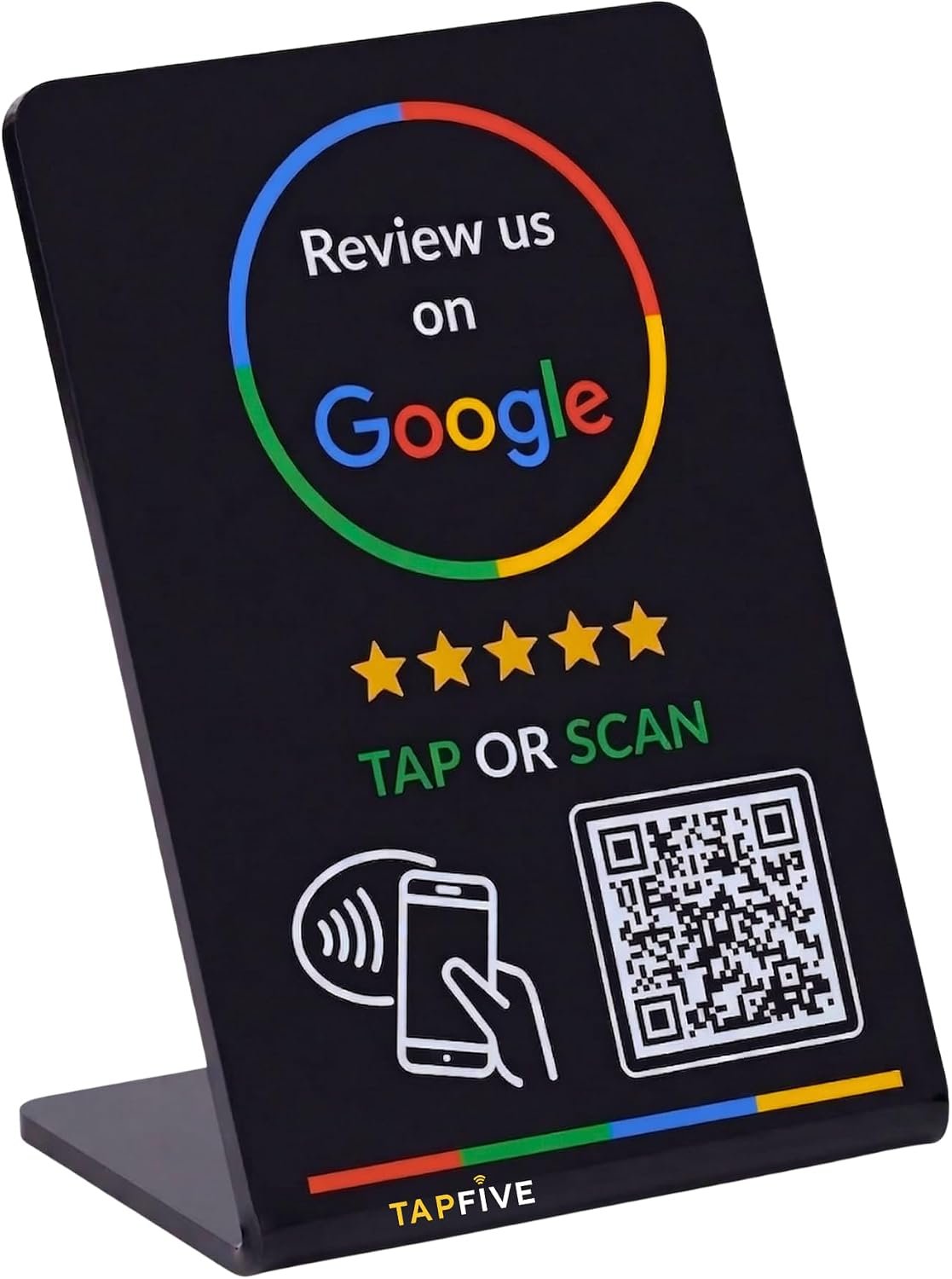
    The Google Review Stand by TapFive is designed around this concept. The product combines NFC tap functionality with a QR code in a compact physical stand intended to help customers access a business’s Google review destination. The listed version is black and includes one stand. It is designed for settings such as restaurants, salons, retail businesses, and front desks, where customers are already interacting with staff or completing a transaction.

    Rather than treating a review sign as a simple piece of decoration, it is helpful to understand how NFC and QR technology work together, where a review stand can fit into a customer experience, and what practical considerations a business should evaluate before using one.

    This guide explores the TapFive Google Review Stand from an informational perspective. It looks at its core features, potential applications, setup considerations, the differences between NFC and QR access, and the factors businesses should consider when deciding whether this type of signage fits their workflow.

    What Is a Google Review Stand?

    A Google review stand is a physical sign or countertop display that gives customers a convenient way to access a business’s online review page.

    Traditionally, businesses might ask customers verbally to search for the company on Google. While this can work, it requires the customer to remember the business name, open a search engine, identify the correct listing, and then locate the review option.

    A physical review stand can simplify that process by placing an access point directly where the customer is already present.

    The TapFive stand uses two common technologies:

    • NFC, which allows compatible smartphones to interact with the stand through a tap
    • A QR code, which customers can scan using a smartphone camera

    These two methods provide different ways of reaching the intended digital destination.

    The combination can be particularly useful because smartphones differ in how users prefer to interact with physical signs. Some people are comfortable tapping their phone against an NFC-enabled sign, while others are more familiar with scanning a QR code.

    Key Features of the TapFive Google Review Stand

    NFC Tap Functionality

    One of the defining features of the TapFive stand is its NFC functionality.

    NFC, or Near Field Communication, is a short-range wireless technology that allows compatible devices to exchange information when they are brought close together. It is commonly used for contactless payments, digital access systems, transportation cards, and other proximity-based interactions.

    In the context of a review stand, NFC can provide a simple interaction. A customer with a compatible smartphone can bring the device close to the designated NFC area, potentially triggering the associated digital destination.

    The main advantage of NFC in this setting is convenience. Instead of opening a camera application and positioning the phone over a QR code, the customer can use a proximity-based interaction.

    The exact behavior can depend on the smartphone, operating system, browser settings, and the way the NFC destination has been configured.

    QR Code Access

    The second major component is the QR code.

    QR codes are two-dimensional barcodes that smartphones can recognize through their cameras. They are widely used in restaurants, retail environments, packaging, advertisements, menus, event signage, and business cards.

    For a review stand, a QR code can serve as a visual alternative to NFC.

    A customer can open the smartphone camera, point it toward the code, and follow the displayed link. This can be helpful for people who are unfamiliar with NFC or whose device does not support the necessary NFC functionality.

    Having both methods available gives the physical stand greater flexibility than relying on a single interaction method.

    Compact Countertop Format

    The product is designed as a stand rather than a large wall-mounted sign.

    This format can be useful for businesses that have customer interaction points such as:

    • Reception counters
    • Checkout desks
    • Restaurant host stands
    • Salon reception areas
    • Hotel front desks
    • Service counters
    • Retail checkout areas
    • Waiting areas

    A countertop format also makes it possible to move the sign between locations when necessary.

    For example, a business could position it near a checkout area during normal operations and move it to a reception desk when the workflow changes.

    Black Finish

    The listed version uses a black finish.

    From a practical design perspective, a neutral color can work with a variety of interior styles. Restaurants, salons, offices, and retail environments often use different branding systems, so a simple black stand may be easier to integrate into an existing counter or reception area than a highly decorative sign.

    The visual appearance is still a secondary consideration compared with whether the QR code and NFC interaction are clearly accessible.

    One-Stand Configuration

    This listing includes one stand.

    A single stand may be appropriate for a small business with one primary customer interaction point. Businesses with several locations or multiple independent checkout or reception areas may need to consider whether one physical sign is sufficient for their workflow.

    For example, a restaurant with one host desk might only need one visible location, while a larger retail environment could have several customer service points.

    How NFC and QR Codes Work Together

    The combination of NFC and QR technology is one of the more interesting aspects of this type of product.

    Although both methods can lead a customer toward the same digital destination, they work differently.

    NFC Interaction

    NFC works through short-range communication between a compatible device and an NFC-enabled object.

    The user typically brings the phone close to the relevant area of the stand. If the device and configuration support the interaction, the phone can recognize the NFC information and provide an option to open the associated destination.

    This can create a quick interaction because it does not require manually typing a web address.

    QR Code Interaction

    QR codes use visual recognition rather than wireless communication.

    The customer points a compatible smartphone camera at the code. The phone recognizes the pattern and normally presents an option to open the linked destination.

    QR codes have the advantage of being visually obvious. Customers can immediately understand that the square graphic is intended to be scanned.

    Why Offer Both?

    Providing both methods can reduce dependence on a single technology.

    Some customers may already understand NFC and prefer tapping their phone. Others may instinctively reach for the camera when they see a QR code.

    The two options can therefore complement one another.

    For businesses, this is less about choosing one technology as universally superior and more about providing customers with multiple convenient paths.

    How It Can Be Used in Restaurants

    Restaurants are one of the most natural environments for a physical review sign because customers frequently complete a defined interaction before leaving.

    A stand could potentially be positioned near the host desk, cashier, reception counter, or another appropriate location.

    For example, after a customer finishes a meal, staff may already have a natural opportunity to thank them for visiting. A review sign placed nearby can make the business’s online review destination more accessible to customers who independently decide they want to leave feedback.

    The important distinction is that the sign should function as an invitation rather than pressure.

    Restaurants can also consider visibility. A stand hidden behind equipment or placed in an area customers rarely see may not serve much purpose. On the other hand, positioning it where customers naturally pause can make the technology easier to discover.

    The right placement depends on the restaurant’s layout and customer flow.

    How It Can Be Used in Salons and Beauty Businesses

    Salons often have a reception desk where customers check in, pay, schedule appointments, or speak with staff.

    A review stand can fit naturally into that environment.

    It could be positioned on a reception counter where customers can see it while completing their visit. The NFC and QR options can then provide a convenient route to the business’s online review destination.

    Salons may also have waiting areas, although placement should not interfere with appointment scheduling, payment processing, or customer privacy.

    As with restaurants, the most useful approach is generally to make the option available without making customers feel obligated to participate.

    How It Can Be Used in Retail Stores

    Retail businesses have several possible locations for a review sign.

    A checkout counter is an obvious example, but the appropriate location depends on store layout.

    A small business could place the stand at the main checkout desk. A specialty retailer might position it near customer service. A showroom could place one near the reception or information desk.

    The physical nature of the stand can make it easier to integrate into an existing point-of-sale environment than a temporary piece of paper or handwritten sign.

    However, businesses should ensure the sign does not obstruct payment terminals, receipts, product displays, or other important customer-service equipment.

    Front Desk and Reception Applications

    Hotels, offices, clinics, service businesses, and other organizations may use reception desks as an important customer interaction point.

    A review stand can be positioned where visitors naturally wait or complete a transaction.

    For businesses that receive customers throughout the day, this can create a consistent location for the digital review access point.

    The main consideration is workflow. Reception staff should not need to interrupt their normal duties to explain complicated instructions. The value of a QR and NFC sign comes partly from its ability to provide a relatively self-directed interaction.

    Who May Find This Type of Product Useful?

    Small Local Businesses

    Small businesses often rely heavily on local search visibility.

    A physical review sign may provide a simple way to connect an in-person customer experience with an online review page.

    This can be particularly relevant for businesses that operate from a single location and have a clear customer checkout or reception point.

    Restaurants and Cafés

    Food-service businesses regularly interact with customers face-to-face, making countertop signage a potentially natural addition to the customer journey.

    The stand may be suitable for restaurants, cafés, bakeries, and similar establishments where customers spend time at a defined location.

    Salons and Personal Services

    Salons, barbershops, spas, and other appointment-based businesses can potentially place the stand at reception.

    Because customers generally interact with staff before leaving, the review stand can become part of the physical environment without requiring a separate digital campaign.

    Retail Businesses

    Small retailers and specialty stores can use countertop signage to provide an easy path to their online presence.

    The usefulness will depend on customer traffic, store layout, and how often customers naturally interact with the selected location.

    Offices and Service Counters

    Professional offices and service businesses can also consider this type of signage where customer feedback is relevant and appropriate.

    Examples might include local service providers, reception-based businesses, studios, and customer-facing offices.

    Important Things to Consider Before Using a Review Stand

    Verify the Destination

    One of the most important considerations is making sure the QR code and NFC destination lead to the intended business location.

    A business may have multiple Google profiles, locations, or online pages. Sending customers to the wrong listing can create confusion.

    Before putting the stand into regular use, it is sensible to test the interaction using multiple compatible smartphones.

    Test Both NFC and QR Functions

    The two technologies should be tested separately.

    A business should verify that:

    1. The QR code can be scanned.
    2. The resulting destination is correct.
    3. The NFC interaction behaves as expected on compatible devices.
    4. The destination works on commonly used mobile browsers.
    5. The sign is positioned so customers can easily access it.

    Testing is especially important after any changes to the business’s online presence.

    Consider Smartphone Differences

    Not every customer uses the same smartphone model or operating system.

    NFC behavior can vary between devices, and some users may not be familiar with tap-to-open interactions.

    This is one reason the QR code can be a useful complementary option.

    A visible QR code gives customers a recognizable alternative if NFC does not work as expected for their particular device.

    Think About Placement

    Placement can have a significant effect on usability.

    A review stand should ideally be easy to see without obstructing important equipment.

    Potential locations include:

    • Checkout counters
    • Reception desks
    • Host stands
    • Customer service counters
    • Waiting areas
    • Information desks

    The best location is usually somewhere customers naturally pause.

    Keep the Area Unobstructed

    A QR code needs to remain visually accessible.

    If receipts, menus, paperwork, promotional materials, or other objects regularly cover part of the sign, customers may not be able to scan it easily.

    Similarly, the NFC area should remain accessible rather than being surrounded by objects that make tapping awkward.

    Consider Customer Experience

    A review request is part of the overall customer experience.

    Businesses should avoid turning the sign into a source of pressure. Customers should be free to decide whether they want to leave feedback.

    The goal of a review stand is convenience, not coercion.

    Review Requests and Platform Policies

    Businesses should also be aware that review platforms have their own policies governing how reviews may be requested.

    A physical sign can provide access to a review page, but businesses should avoid using it to manipulate the nature of customer feedback.

    For example, a business should be careful about practices that attempt to selectively encourage only positive reviews while discouraging negative feedback.

    The safest approach is to provide a neutral opportunity for customers to share their genuine experience.

    This distinction is important because the purpose of review technology should be to make the feedback process easier, not to manufacture a particular outcome.

    NFC Versus QR Codes: Understanding the Difference

    Businesses considering digital review signage may encounter several categories of products.

    QR-Only Signs

    QR-only signs are generally straightforward. Customers scan a visual code with their smartphone camera.

    Their main strength is familiarity. QR codes are now common in many everyday environments.

    The limitation is that the customer must physically position the camera correctly and interact with the scanning interface.

    NFC-Only Signs

    NFC-only solutions focus on proximity-based interaction.

    They can provide a convenient experience for compatible devices, but customers unfamiliar with NFC may not immediately understand what to do.

    Device compatibility can also be an important consideration.

    Combined NFC and QR Signs

    A combined product provides both interaction methods.

    This can make sense for businesses that want to accommodate different customer preferences without placing separate signs on the counter.

    The TapFive stand falls into this combined category, providing a physical stand with both NFC and QR access.

    Printed Review Cards

    Businesses can also use conventional printed cards.

    These may contain a QR code, a web address, or instructions for finding the business online.

    Printed cards can be inexpensive and easy to distribute, but they can also be easier to lose or overlook.

    A countertop stand has the advantage of remaining in a designated physical location.

    Practical Ways to Integrate the Stand Into a Business Workflow

    A review stand does not necessarily need to be treated as a separate marketing campaign.

    It can simply become part of the existing customer environment.

    For example, a restaurant could place it near the host station. A salon could position it at reception. A retail store could keep it near the checkout counter.

    The key is consistency.

    If the stand is moved frequently, customers and staff may not know where to find it. If it remains in a predictable location, employees can easily direct customers toward it when appropriate.

    Another useful consideration is staff training. Employees do not necessarily need a detailed technical explanation of NFC. They simply need to understand what the sign is for and how customers can interact with it.

    Maintaining a Professional Appearance

    Even a technically useful sign can become less effective if the surrounding area looks cluttered.

    A review stand works best when it fits naturally into the environment.

    Businesses can consider keeping the surrounding countertop organized and ensuring the sign remains upright and visible.

    For restaurants and salons in particular, the physical appearance of the customer-facing environment can contribute to the overall impression of the business.

    A simple black stand may therefore be easier to incorporate into a variety of interior styles than highly promotional signage.

    Frequently Asked Questions

    What is the TapFive Google Review Stand?

    The TapFive Google Review Stand is a physical countertop sign designed to provide customers with access to a business’s Google review destination using NFC tap functionality and a QR code.

    Does the stand require customers to use NFC?

    No. The product combines NFC and QR access, allowing customers to use the method that is appropriate for their smartphone and preferences.

    What is NFC?

    NFC stands for Near Field Communication. It is a short-range wireless technology that allows compatible devices to communicate when they are brought close together.

    What is the purpose of the QR code?

    The QR code provides a visual scanning option. Customers can use a compatible smartphone camera to scan the code and follow the resulting link.

    Can this type of stand be used in a restaurant?

    Yes. A restaurant can potentially use a review stand at an appropriate customer interaction point, such as a host desk or checkout counter.

    Could a salon use the stand?

    A salon may place it at reception or another suitable customer-facing area. The exact placement depends on the salon’s layout and workflow.

    Is it suitable for retail businesses?

    It can be considered for retail environments, particularly at checkout or customer service counters where customers naturally interact with staff.

    Does every smartphone support NFC in the same way?

    No. NFC functionality and behavior can vary depending on the smartphone, operating system, settings, and other technical factors. This is one reason having a QR code available can be useful.

    Should a business test the stand before using it?

    Yes. Testing the QR code and NFC functionality with multiple compatible devices can help identify potential problems before customers encounter them.

    Where should a review stand be placed?

    Common locations include reception desks, checkout counters, restaurant host stands, customer service desks, and other areas where customers naturally pause.

    Does having a review stand guarantee more reviews?

    No. A physical sign can make the review destination easier to access, but it cannot guarantee that customers will leave reviews. Customer satisfaction, willingness to provide feedback, visibility, and many other factors influence review activity.

    Can a business require customers to leave a review?

    A business should treat review requests carefully and respect applicable platform policies. A review sign is best used as an optional way for customers to access the review process rather than as a requirement.

    Is a QR code still useful if NFC is available?

    Yes. QR codes provide a familiar alternative for customers who prefer scanning or whose devices do not interact with NFC in the expected way.

    Is one stand enough for every business?

    It depends on the business. A small business with one primary reception or checkout area may find one stand sufficient, while businesses with multiple locations or customer service points may have different signage needs.

    Conclusion

    The TapFive Google Review Stand represents a simple connection between a physical customer environment and a digital review destination. By combining NFC tap technology with a QR code, the stand provides two different ways for customers to access the relevant online page using a smartphone.

    Its countertop format makes it potentially useful in a variety of settings, including restaurants, salons, retail stores, reception areas, and other customer-facing businesses. The black finish can also fit naturally into many professional environments without requiring elaborate signage.

    The most important considerations are not simply the presence of NFC or a QR code. Businesses should verify that the digital destination is correct, test the interaction across different devices, choose an appropriate location, and make the review process optional and straightforward for customers.

    A physical review stand cannot replace good service or guarantee customer feedback. Its role is more practical: it can reduce the steps required for customers who already want to share their experience.

    For businesses considering NFC and QR-based review signage, understanding these practical details can make it easier to determine whether a countertop solution fits their customer journey and day-to-day operations.

    You can check more details on Amazon here.